Showing posts with label Facebook. Show all posts

Check & Cancel Pending Friend Requests On Facebook

Tuesday, 11 September 2012
You might have send many friend request to your friends on Facebook. Do you want to check who was not accepted your friend request ? Now you can check the pending friend requests on Facebook. Here is the total guide to check the requests which are not accepted by your friends.

How to check the pending friend requests on Facebook

# Step-1
# Step-2
  • Click the Bulk Load button.
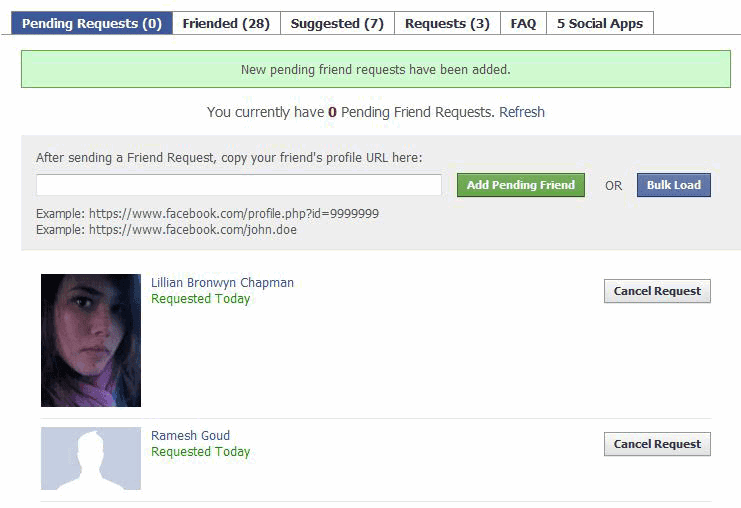
  • You will see the options like in the below image.

# Step-3
  • Now "Click on the Get Friend Request Data" button.
  • A small window will pop. Copy all the text and paste it in the Load Friend Requests box.
  • Press "Load Friend Requests" button.
  • Now it will show all the pending friend requests list.
  • Now you can cancel the pending friend requests.
Read more ...

Check & Cancel Pending Friend Requests On Facebook

Tuesday, 11 September 2012
You might have send many friend request to your friends on Facebook. Do you want to check who was not accepted your friend request ? Now you can check the pending friend requests on Facebook. Here is the total guide to check the requests which are not accepted by your friends.

How to check the pending friend requests on Facebook

# Step-1
# Step-2
  • Click the Bulk Load button.
  • You will see the options like in the below image.

# Step-3
  • Now "Click on the Get Friend Request Data" button.
  • A small window will pop. Copy all the text and paste it in the Load Friend Requests box.
  • Press "Load Friend Requests" button.
  • Now it will show all the pending friend requests list.
  • Now you can cancel the pending friend requests.
Read more ...

Hire a Girfriend on Facebook, Just for $5

Friday, 3 August 2012


Well, its true! Now you can hire girlfriends on Facebook. Fiverr.com is a new classified site where you can hire Facebook girlfriends for as low as $5. These girlfriends will do particular tasks such as posting on your wall, liking your comments, jealous your ex etc, for a particular period of time.These girlfriends post comments on your wall, page, group etc. Some of the girlfriends even post videos and say whatever you want.

Most of the girlfriends will offer her services for $5/week, some are generous and offer their services for $5/month. You can choose a girlfriend from any country since there are a lots of girls around the world offering their services.
Read more ...

Hire a Girfriend on Facebook, Just for $5

Friday, 3 August 2012


Well, its true! Now you can hire girlfriends on Facebook. Fiverr.com is a new classified site where you can hire Facebook girlfriends for as low as $5. These girlfriends will do particular tasks such as posting on your wall, liking your comments, jealous your ex etc, for a particular period of time.These girlfriends post comments on your wall, page, group etc. Some of the girlfriends even post videos and say whatever you want.

Most of the girlfriends will offer her services for $5/week, some are generous and offer their services for $5/month. You can choose a girlfriend from any country since there are a lots of girls around the world offering their services.
Read more ...

Hire a Girfriend on Facebook, Just for $5

Monday, 23 July 2012

Well, its true! Now you can hire girlfriends on Facebook. Fiverr.com is a new classified site where you can hire Facebook girlfriends for as low as $5. These girlfriends will do particular tasks such as posting on your wall, liking your comments, jealous your ex etc, for a particular period of time.These girlfriends post comments on your wall, page, group etc. Some of the girlfriends even post videos and say whatever you want.

Most of the girlfriends will offer her services for $5/week, some are generous and offer their services for $5/month. You can choose a girlfriend from any country since there are a lots of girls around the world offering their services.
Read more ...

Hire a Girfriend on Facebook, Just for $5

Monday, 23 July 2012

Well, its true! Now you can hire girlfriends on Facebook. Fiverr.com is a new classified site where you can hire Facebook girlfriends for as low as $5. These girlfriends will do particular tasks such as posting on your wall, liking your comments, jealous your ex etc, for a particular period of time.These girlfriends post comments on your wall, page, group etc. Some of the girlfriends even post videos and say whatever you want.

Most of the girlfriends will offer her services for $5/week, some are generous and offer their services for $5/month. You can choose a girlfriend from any country since there are a lots of girls around the world offering their services.
Read more ...

7 Reasons Why Facebook is Loosing its Popularity Now a Days

Monday, 18 June 2012

Facebook, no doubt is still number of Social networking website however Facebook is loosing its popularity due to several factors. Many people who earlier were facebook insects have started saying Facebook is a boring network. Actually no one is responsible for this except Facebook's design team because recently so much features were introduced and most of people didn't like most of features. There are 7 other reasons why Facebook is loosing popularity.


1- New Facebook Chat

Earlier, Facebook's chat system was really cool. But the recent chat in Facebook's chat design is one of the most hated upgrades done by Facebook. Now its compulsory to keep a chat sidebar opened while you are chatting. This makes the rest of page smaller which annoys most of regular Facebook users. Though you can get old facebook chat back but there is still no official remedy for this.


2. New Facebook Photo Viewer

Earlier, it was much cleaner and easier to view pictures in Facebook but the upgraded Facebook photo viewer called "new theater photo viewer" is yet another one of most hated Facebook upgrade. Though its a convenient way to view photos but the black window that pops-out on click, cause layout issues and most of people just don't like this.


3- This Friend Request can't be sent

This is most annoying security check in Facebook. They say you cant add strangers in your Facebook so you cant make requests. They consider this spam and threat you to disable your account. Well, if we cant make new friends on Facebook, what’s the use of Social networking then ? However we can add strangers if we have a mutual friend... that's really disgusting !


4. Fake profiles

This is the common reason between Orkut and Facebook. Orkut also lost its popularity because of fake profiles and Facebook is also facing this problem. There are 700+ Facebook accounts and more than 55% are either unverified, duplicate or fake accounts. Fake accounts are used for spamming or promoting abusive content and unfortunately Facebook is doing nothing for this.


5. Bad privacy policy

Earlier, people migrated from Orkut to Facebook because of nice Privacy options but now a days Facebook is also playing with its repute by changing privacy policy settings. Facebook, by default, recommends every one to share each and everything (statuses, photos etc) with public. Most of privacy options are confusing and there's always something that user couldn't figure out.


6. Spam

SPAM SPAM SPAM... this is what you will see everywhere on Facebook. Facebook pages is one of top features which are causing SPAM in Facebook. You will see thousands of pages saying "Like this Page to check who see your profile" , "Like this Page to View bla bla bla" , "Like This page to Win Gifts" etc. Many people have migrated to Google+ because of this.


7. Errors and Bugs

Last but not least, many times your Facebook account is not available due to bugs, errors or technical things. This makes users really frustrated. Many times we get "Facebook is not able to process our request" and the only reason is SPAM and fake profiles. Facebook does not have a better management for accounts. Due to access of profiles, these errors occur.


Did i miss any point ? post via comments !

Read more ...

7 Reasons Why Facebook is Loosing its Popularity Now a Days

Monday, 18 June 2012

Facebook, no doubt is still number of Social networking website however Facebook is loosing its popularity due to several factors. Many people who earlier were facebook insects have started saying Facebook is a boring network. Actually no one is responsible for this except Facebook's design team because recently so much features were introduced and most of people didn't like most of features. There are 7 other reasons why Facebook is loosing popularity.


1- New Facebook Chat

Earlier, Facebook's chat system was really cool. But the recent chat in Facebook's chat design is one of the most hated upgrades done by Facebook. Now its compulsory to keep a chat sidebar opened while you are chatting. This makes the rest of page smaller which annoys most of regular Facebook users. Though you can get old facebook chat back but there is still no official remedy for this.


2. New Facebook Photo Viewer

Earlier, it was much cleaner and easier to view pictures in Facebook but the upgraded Facebook photo viewer called "new theater photo viewer" is yet another one of most hated Facebook upgrade. Though its a convenient way to view photos but the black window that pops-out on click, cause layout issues and most of people just don't like this.


3- This Friend Request can't be sent

This is most annoying security check in Facebook. They say you cant add strangers in your Facebook so you cant make requests. They consider this spam and threat you to disable your account. Well, if we cant make new friends on Facebook, what’s the use of Social networking then ? However we can add strangers if we have a mutual friend... that's really disgusting !


4. Fake profiles

This is the common reason between Orkut and Facebook. Orkut also lost its popularity because of fake profiles and Facebook is also facing this problem. There are 700+ Facebook accounts and more than 55% are either unverified, duplicate or fake accounts. Fake accounts are used for spamming or promoting abusive content and unfortunately Facebook is doing nothing for this.


5. Bad privacy policy

Earlier, people migrated from Orkut to Facebook because of nice Privacy options but now a days Facebook is also playing with its repute by changing privacy policy settings. Facebook, by default, recommends every one to share each and everything (statuses, photos etc) with public. Most of privacy options are confusing and there's always something that user couldn't figure out.


6. Spam

SPAM SPAM SPAM... this is what you will see everywhere on Facebook. Facebook pages is one of top features which are causing SPAM in Facebook. You will see thousands of pages saying "Like this Page to check who see your profile" , "Like this Page to View bla bla bla" , "Like This page to Win Gifts" etc. Many people have migrated to Google+ because of this.


7. Errors and Bugs

Last but not least, many times your Facebook account is not available due to bugs, errors or technical things. This makes users really frustrated. Many times we get "Facebook is not able to process our request" and the only reason is SPAM and fake profiles. Facebook does not have a better management for accounts. Due to access of profiles, these errors occur.


Did i miss any point ? post via comments !

Read more ...

Trick to Get Old Facebook Chat Back - New Facebook Chat is Not That Good

Monday, 18 June 2012

Recently, Facebook made many changes such as they introduced Facebook Messages, Facebook Video Chat and they also made changes in Facebook Chat system. New Facebook Chat shows also those people who are not online and many people just hate this thing or this does not satisfy them. If you are one of them who do not like new Facebook Chat, here is a good news for you; now you can get old Facebook chat back easily.


This trick needs a software to be installed in your browser. Currently, you can get old Facebook chat on Mozilla Firefox and Google Chrome browsers as they support latest scripts. If you are using FireFox or Chrome, follow this trick else first download any of these two browser.


How to Get Old Facebook Chat Back ?

  • If you using Mozilla Firefox, Click here to install an addone called Greasemonkey. After installation, restart firefox (if you are using chrome, move to next step)


  • Using Chrome or Firefox, Whatever... Click Here to install a script called Facebook Sidebar Chat Reversion. This works on Firefox and Chrome both.


  • Install this script on your browser, restart your browser and Enjoy Old Facebook Chat Back !

Read more ...

Trick to Get Old Facebook Chat Back - New Facebook Chat is Not That Good

Monday, 18 June 2012

Recently, Facebook made many changes such as they introduced Facebook Messages, Facebook Video Chat and they also made changes in Facebook Chat system. New Facebook Chat shows also those people who are not online and many people just hate this thing or this does not satisfy them. If you are one of them who do not like new Facebook Chat, here is a good news for you; now you can get old Facebook chat back easily.


This trick needs a software to be installed in your browser. Currently, you can get old Facebook chat on Mozilla Firefox and Google Chrome browsers as they support latest scripts. If you are using FireFox or Chrome, follow this trick else first download any of these two browser.


How to Get Old Facebook Chat Back ?

  • If you using Mozilla Firefox, Click here to install an addone called Greasemonkey. After installation, restart firefox (if you are using chrome, move to next step)


  • Using Chrome or Firefox, Whatever... Click Here to install a script called Facebook Sidebar Chat Reversion. This works on Firefox and Chrome both.


  • Install this script on your browser, restart your browser and Enjoy Old Facebook Chat Back !

Read more ...

Top 10 Reasons Why People Block or UnFriend You on Facebook

Sunday, 17 June 2012
Facebook is the most popular social networking site with millions of people accessing their walls daily. It is one of the best ways to stay connected with your friends and to search your old friends with whom you have lost your contact. However there are people who may ignore you or block you because of some annoying habit of yours. So let us look at some of the reasons which make people hate you on such a lovely site.


10. You leave irrelevant comments

Posting some comments that are not relevant to the message or a status is one reason people may start ignoring you.” Haha” and “lol” are not irrelevant comments but you should read the status twice before posting them. They do not fit everywhere.


9. You leave rude comments

Each one of us have our own up and downs life. There are situations when our anger is beyond a certain limit. In such a situation avoid visiting Facebook as even the slightest of thing can blow you off. You may spit all your anger at someone else because of their status by commenting in the rudest way possible. This will only end up in people hating you.


8. You send them constant game requests

Facebook is full of such games that require you to take help of your friends to progress further. While you may be enjoying the game, your friend may be busy with something else. In such a scenario, the last thing they will like would be a game request. People also get pissed with constant requests as it unnecessarily extends their notification.


7. You send them different Facebook application requests

There are a plethora of applications on Facebook that request you to suggest the same apps to your friends too. Such applications offer you to do so, on a constant basis and if you follow and send them suggestions it is very much likely that you will start dwindling in their good books.


6. You tag people in random photos and videos

People get annoyed the most when they are tagged in photos that have no relevance to them or no connection with them. Doing so, you only spam their accounts creating a link that will make them visit your photo. Avoid it.


5. You send people promotional messages

One can send private messages to their friends that are accessible only to them. However, this does not give you the liberty to spam their inbox with promotional messages or advertisements. People will definitely start hating you after this.


4. You always keep pinging people to chat

Facebook allows you to get in touch with your friends and have a nice chat with them. However, there are some people who are always free and are in search of people to start random conversations. If you are one of the, there is no reason people will like you.


3. You promote your products and services by posting on others wall

Facebook gives you the liberty to write on your friend’s wall to stay connected. It is no advertisement board to promote your goods. This only spams their wall making people to hate you.


2. You keep re-adding people as friends, after deleting them

Sometimes you may remove some people from your lists because you are mad at them because of something. Later you realize it and send them a friend request again. You should avoid such practice as people may not like being deleted and then getting back a request gain.


1. You post people's personal information publicly

Someone might be really close to you and share all their details with you but this does not give you the right to post it on Facebook for others to read. If you continue doing so, you yourself give the other person all the reasons to unfriend you.
Read more ...

Top 10 Reasons Why People Block or UnFriend You on Facebook

Sunday, 17 June 2012
Facebook is the most popular social networking site with millions of people accessing their walls daily. It is one of the best ways to stay connected with your friends and to search your old friends with whom you have lost your contact. However there are people who may ignore you or block you because of some annoying habit of yours. So let us look at some of the reasons which make people hate you on such a lovely site.


10. You leave irrelevant comments

Posting some comments that are not relevant to the message or a status is one reason people may start ignoring you.” Haha” and “lol” are not irrelevant comments but you should read the status twice before posting them. They do not fit everywhere.


9. You leave rude comments

Each one of us have our own up and downs life. There are situations when our anger is beyond a certain limit. In such a situation avoid visiting Facebook as even the slightest of thing can blow you off. You may spit all your anger at someone else because of their status by commenting in the rudest way possible. This will only end up in people hating you.


8. You send them constant game requests

Facebook is full of such games that require you to take help of your friends to progress further. While you may be enjoying the game, your friend may be busy with something else. In such a scenario, the last thing they will like would be a game request. People also get pissed with constant requests as it unnecessarily extends their notification.


7. You send them different Facebook application requests

There are a plethora of applications on Facebook that request you to suggest the same apps to your friends too. Such applications offer you to do so, on a constant basis and if you follow and send them suggestions it is very much likely that you will start dwindling in their good books.


6. You tag people in random photos and videos

People get annoyed the most when they are tagged in photos that have no relevance to them or no connection with them. Doing so, you only spam their accounts creating a link that will make them visit your photo. Avoid it.


5. You send people promotional messages

One can send private messages to their friends that are accessible only to them. However, this does not give you the liberty to spam their inbox with promotional messages or advertisements. People will definitely start hating you after this.


4. You always keep pinging people to chat

Facebook allows you to get in touch with your friends and have a nice chat with them. However, there are some people who are always free and are in search of people to start random conversations. If you are one of the, there is no reason people will like you.


3. You promote your products and services by posting on others wall

Facebook gives you the liberty to write on your friend’s wall to stay connected. It is no advertisement board to promote your goods. This only spams their wall making people to hate you.


2. You keep re-adding people as friends, after deleting them

Sometimes you may remove some people from your lists because you are mad at them because of something. Later you realize it and send them a friend request again. You should avoid such practice as people may not like being deleted and then getting back a request gain.


1. You post people's personal information publicly

Someone might be really close to you and share all their details with you but this does not give you the right to post it on Facebook for others to read. If you continue doing so, you yourself give the other person all the reasons to unfriend you.
Read more ...

How to use Facebook to Increase Your Online Earnings

Saturday, 16 June 2012
It is not at all an easy task to run an online business successfully. If you do not know the tricks to market and advertise your online business then it is definite that you will find yourself struggling to keep it going. If you want to make online money then there is a plethora of ways to do so, but then you need to have basics right before you actually plunge yourself into the pool. If you want to setup your own e-commerce website and sell off some products or want to run a block and earn through pay per clicks programs it is up to you. Whatever it is, you can use Facebook as a medium for promotion. Facebook is visited by millions and also offers you a much wider and global reach within a minute. It can help you earn some significant account of money. Let us see how.


Website promotion

It is one of the most common ways to launch an online website and offer different services and products but then it can be successful only if you promote it well. There are a number of websites that offer their services to promote your websites but then those only add a back link to your website. These may help you to generate traffic for the site but one needs to be quite patient as it may take time. On the other you can post about it on Facebook or go one step ahead and add a web camera feed to the site and then share it on Facebook.


Marketing

Looking at the popularity of the website you can use it for marketing as well. All you need to do is to setup a Facebook page mentioning about your services. Then keep updating the page so that your friends get reminders about it. You can also add new services to it. To make the page more interactive you can post polls where people can share in their view points.


Sell your products

You can actually use the website to sell off your products directly. This will let you get in touch with your customers on a one to one basis and will also let you know about their likes and dislikes. You can also ask their suggestions if they are not satisfied with your offerings.


Facebook Applications

One of the main reasons why Facebook is so popular apart from the fact that it lets you stay connected is the interesting applications it offers. It is a very amusing way to kill time. There are a myriad of different games that one can play for hours. You can also develop applications for the website and earn some money from it. However, do not develop just any application. Before you actually start developing it, analyze the market once and study its needs. If you do not have the resources to make your application running by yourself then you can sell off your ideas to some big companies. You are sure to make fortunes if they like it.
Read more ...

Facebook Will Start Charging Users for its Services

Saturday, 16 June 2012
Facebook is one of the most widely used social networking sites these days. Every day million of users browse this website. It is has offered the people to stay connected with their friends. With increasing popularity of the website, the website has added new features time and again to entice the users. Well, Facebook is no more a free website !


When Google launched its new service, Google+, Facebook added a number of features including group chat and video chat to offer a new interface. Apart from the new design, Facebook is also planning to implement a new plan i.e. it would no longer be a free service, one will have to pay a monthly charge to stay connected.


When Mark Zuckerberg had designed the website back in 2004 in his college dorm room, he would have never imagined that the site would become such a huge hit. Recently, Mark announced a host of new features that he plans to introduce in times to come. Rumors are around that he is also planning to bring the service to an end and shut the website down in the following year. He however did not comment on the topic and kept quiet about it.


If stories are to be believed then the Facebook will be closed on 15th March, 2012. But who knows if Mark has something else going on in his mind. There has been too much pressure on him and Facebook is looking for a solution to convince Mark to keep the site going.


They are planning to turn the website into a subscription-based service that will charge you a basic fee that will enable to upload only a single profile picture and just post text. The fee will vary depending on the number of your friends, the number of messages you send and post and the number of pictures, videos you upload. It is estimated that it would reach somewhere around $50 maximum. In short, the more you use the more you pay. Some stories are around that it will charge $9.99 for Gold services, $6.99 for Silver services and $3.99 for bronze services each month. One can select any of the three packs based on their usage.


However, some investors including Goldman Sachs are actually thrilled by the prospect of Facebook changing into a pay service. According to Tom Wortowski associated with Goldman Sachs this will make Facebook all the more lucrative as an investment. Those who are keeping a close eye on the industry say that if it happens, Facebook will generate more than $20 billion as revenue.


The estimates also account for the fact that a majority of users will switch to other free services if Facebook start charging its users. The executives at Facebook are not paying any heed to it and are thrilled about the new prospect. Whatever said and done, we will have to wait for 15th March 2012 that is the Facebook day to actually know if the website will charge the users or will see its final day.
Read more ...

How to use Facebook to Increase Your Online Earnings

Saturday, 16 June 2012
It is not at all an easy task to run an online business successfully. If you do not know the tricks to market and advertise your online business then it is definite that you will find yourself struggling to keep it going. If you want to make online money then there is a plethora of ways to do so, but then you need to have basics right before you actually plunge yourself into the pool. If you want to setup your own e-commerce website and sell off some products or want to run a block and earn through pay per clicks programs it is up to you. Whatever it is, you can use Facebook as a medium for promotion. Facebook is visited by millions and also offers you a much wider and global reach within a minute. It can help you earn some significant account of money. Let us see how.


Website promotion

It is one of the most common ways to launch an online website and offer different services and products but then it can be successful only if you promote it well. There are a number of websites that offer their services to promote your websites but then those only add a back link to your website. These may help you to generate traffic for the site but one needs to be quite patient as it may take time. On the other you can post about it on Facebook or go one step ahead and add a web camera feed to the site and then share it on Facebook.


Marketing

Looking at the popularity of the website you can use it for marketing as well. All you need to do is to setup a Facebook page mentioning about your services. Then keep updating the page so that your friends get reminders about it. You can also add new services to it. To make the page more interactive you can post polls where people can share in their view points.


Sell your products

You can actually use the website to sell off your products directly. This will let you get in touch with your customers on a one to one basis and will also let you know about their likes and dislikes. You can also ask their suggestions if they are not satisfied with your offerings.


Facebook Applications

One of the main reasons why Facebook is so popular apart from the fact that it lets you stay connected is the interesting applications it offers. It is a very amusing way to kill time. There are a myriad of different games that one can play for hours. You can also develop applications for the website and earn some money from it. However, do not develop just any application. Before you actually start developing it, analyze the market once and study its needs. If you do not have the resources to make your application running by yourself then you can sell off your ideas to some big companies. You are sure to make fortunes if they like it.
Read more ...

Facebook Will Start Charging Users for its Services

Saturday, 16 June 2012
Facebook is one of the most widely used social networking sites these days. Every day million of users browse this website. It is has offered the people to stay connected with their friends. With increasing popularity of the website, the website has added new features time and again to entice the users. Well, Facebook is no more a free website !


When Google launched its new service, Google+, Facebook added a number of features including group chat and video chat to offer a new interface. Apart from the new design, Facebook is also planning to implement a new plan i.e. it would no longer be a free service, one will have to pay a monthly charge to stay connected.


When Mark Zuckerberg had designed the website back in 2004 in his college dorm room, he would have never imagined that the site would become such a huge hit. Recently, Mark announced a host of new features that he plans to introduce in times to come. Rumors are around that he is also planning to bring the service to an end and shut the website down in the following year. He however did not comment on the topic and kept quiet about it.


If stories are to be believed then the Facebook will be closed on 15th March, 2012. But who knows if Mark has something else going on in his mind. There has been too much pressure on him and Facebook is looking for a solution to convince Mark to keep the site going.


They are planning to turn the website into a subscription-based service that will charge you a basic fee that will enable to upload only a single profile picture and just post text. The fee will vary depending on the number of your friends, the number of messages you send and post and the number of pictures, videos you upload. It is estimated that it would reach somewhere around $50 maximum. In short, the more you use the more you pay. Some stories are around that it will charge $9.99 for Gold services, $6.99 for Silver services and $3.99 for bronze services each month. One can select any of the three packs based on their usage.


However, some investors including Goldman Sachs are actually thrilled by the prospect of Facebook changing into a pay service. According to Tom Wortowski associated with Goldman Sachs this will make Facebook all the more lucrative as an investment. Those who are keeping a close eye on the industry say that if it happens, Facebook will generate more than $20 billion as revenue.


The estimates also account for the fact that a majority of users will switch to other free services if Facebook start charging its users. The executives at Facebook are not paying any heed to it and are thrilled about the new prospect. Whatever said and done, we will have to wait for 15th March 2012 that is the Facebook day to actually know if the website will charge the users or will see its final day.
Read more ...

Connect Your Twitter account with Facebook and Post Tweets Automatically

Saturday, 16 June 2012
Facebook is one of the most widely used social networking website. It is one of the most preferred website to stay in touch with your friends. You can also stay connected with a number of other people. Facebook is also becoming popular for a number of other reasons too including promotion and marketing. Twitter on the other is a micro-blogging website wherein you can send updates and also receive them from others. You need to follow your friends in order to receive their friends. Both the websites are popular and are also used by a number of celebrities too.


However, when you are on both of them you have to log in to the both of them to update your status and to know what’s happening around. If you want to avoid doing so, then you can actually interlink both your accounts to save your time. The method is quite simple and takes only a few minutes.


Steps to connect the accounts

  • Log in to your Facebook account and open this URL http://www.facebook.com/apps/application.php?id=2231777543
  • On the right top, you will find a button Go to App to add the application.
  • On the next page, you will see a button that says “Go to your Twitter Profile Settings to start”.
  • When you will click on the button, you will be redirected to the Twitter website.
  • You will be required into Twitter. Enter your Twitter account’s user name and password. Your log-in information is safe.
  • Once you successfully login into Twitter you will automatically taken to the profile page.
  • Scroll down the page till the Facebook option. There you will find a button that says “Posts your tweets to Facebook “and then press Save.
  • Allow the application and Authorize Access for Twitter to Facebook.
  • Once you do so then every time you update anything of Twitter it will also be changed on Facebook too.


However, there are a few things that you must remember. To begin with, replies on twitter would not be received in your Facebook amount. Also make sure that you do not tweet unnecessarily on Twitter and that too in excess because it will get annoying for your friends added on Facebook as they will get regular updates in their new feed.
Read more ...

Connect Your Twitter account with Facebook and Post Tweets Automatically

Saturday, 16 June 2012
Facebook is one of the most widely used social networking website. It is one of the most preferred website to stay in touch with your friends. You can also stay connected with a number of other people. Facebook is also becoming popular for a number of other reasons too including promotion and marketing. Twitter on the other is a micro-blogging website wherein you can send updates and also receive them from others. You need to follow your friends in order to receive their friends. Both the websites are popular and are also used by a number of celebrities too.


However, when you are on both of them you have to log in to the both of them to update your status and to know what’s happening around. If you want to avoid doing so, then you can actually interlink both your accounts to save your time. The method is quite simple and takes only a few minutes.


Steps to connect the accounts

  • Log in to your Facebook account and open this URL http://www.facebook.com/apps/application.php?id=2231777543
  • On the right top, you will find a button Go to App to add the application.
  • On the next page, you will see a button that says “Go to your Twitter Profile Settings to start”.
  • When you will click on the button, you will be redirected to the Twitter website.
  • You will be required into Twitter. Enter your Twitter account’s user name and password. Your log-in information is safe.
  • Once you successfully login into Twitter you will automatically taken to the profile page.
  • Scroll down the page till the Facebook option. There you will find a button that says “Posts your tweets to Facebook “and then press Save.
  • Allow the application and Authorize Access for Twitter to Facebook.
  • Once you do so then every time you update anything of Twitter it will also be changed on Facebook too.


However, there are a few things that you must remember. To begin with, replies on twitter would not be received in your Facebook amount. Also make sure that you do not tweet unnecessarily on Twitter and that too in excess because it will get annoying for your friends added on Facebook as they will get regular updates in their new feed.
Read more ...

How to Get Rid of the New Facebook Ticker

Saturday, 16 June 2012

After the launch of Google+, Facebook has been introducing a whole new range of features to keep the users enticed. Some of them have been already introduced while it plans to introduce a host of them soon which it talked about in the f8 Developer conference. The features that has been introduced already include the chat features like group chats and video chats, the subscribe button, the twitter auto updates and the ticker.


Out of all, the Ticker is the most talked about features. The ticker appears in the right side of your screen on top of the chat box and it displays every latest update from all your friends in real-time. However, majority of people do not like the new feature and are looking out for alternatives to revert back to the previous features. Some of them find it completely irritating. One could have changed their account settings but that has also become quite complicated.


Since so many people hated the new Ticket, there is actually a way to remove the Ticker using a Google Chrome extension. As, the name suggests, it is Google Chrome plug-in so the ones using Firefox or Internet Explorer will have to wait. So what, if you are not using Chrome then you can switch to it for a temporary basis to check Facebook at least.


There is Chrome extension that is called the Facebook News Ticker Remover. The name says it all. The extension is distributed under the freeware license making it all the more preferable. Just download the extension from the web store and install it on your browser. Now restart the browser and log in to Facebook. You will be surprised to see that there is no Ticker box.


Those who are using Firefox or Explorer needs to be a little more patient, as the developer’s are developing extensions for them also which would be available soon.

Read more ...

How to Enable New Facebook Timeline in Profiles

Saturday, 16 June 2012
Recently the f8 was held recently on the 22nd of September where Facebook has announced to launch a much better and improved profile called the Timeline. Looking at the present situation, it seems that the one will have to wait for months before they can lay their hands on the new profile. The Timeline profile has a visually attractive interface and is absolutely amazing to work on. The new Timeline profile has a number of new features that also include a feature called stalker that enables you to view everything you have ever done of Facebook.


The new profile is much alluring and captivating than the current one. However, irrespective of its pretty amazing features, it takes time to set it up so one cannot be sure if the Facebook users will take time to do so. On the other hand, if f you are completely mesmerized by the profile and want to try it right away then there is actually a way to do so and actually feel what the Timeline profile has to offer.


You can follow the steps below to enable the new profile even before it is launched officially. All you need to do is to enable the developer mode. You are also required to build an app but then it is quite simple.


How to Enable Facebook Timeline

1- Before we start with the procedure make sure that you have a mobile number connected with your profile. If not, you can go into Account settings and add a mobile number there.


2- Look for the Developer App on Facebook or you directly navigate to the address developers.facebook.com/apps.


3- When you choose the Create New App option it will ask you for a name for the application. You can name your app anything you like. Sine one does not actually have to create an app you can name it anything. The app is developed to get approval as a Facebook developer and enable oneself to use the Timeline feature.


4- You will have to give some details for the application. Navigate to open graph in the left sidebar. Now enter any test action like watch television, read a magazine or anything else.


5- Then it will again ask you to fill in some details. You can easily skip this page and click on next. Keep clicking on Next until you reach the page that says Save and Finish page. This will create an application but will not be visible to anyone, except you.


Once you have successfully finished the above steps, you can visit your profile again where an invitation to try out the new Timeline profile would be waiting for you.


Read more ...